# 4D Gaussian Splatting for Real-Time Dynamic Scene Rendering
## CVPR 2024
### [Project Page](https://guanjunwu.github.io/4dgs/index.html)| [arXiv Paper](https://arxiv.org/abs/2310.08528)
[Guanjun Wu](https://guanjunwu.github.io/) 1*, [Taoran Yi](https://github.com/taoranyi) 2*,
[Jiemin Fang](https://jaminfong.cn/) 3‡, [Lingxi Xie](http://lingxixie.com/) 3 , [Xiaopeng Zhang](https://scholar.google.com/citations?user=Ud6aBAcAAAAJ&hl=zh-CN) 3 , [Wei Wei](https://www.eric-weiwei.com/) 1 ,[Wenyu Liu](http://eic.hust.edu.cn/professor/liuwenyu/) 2 , [Qi Tian](https://www.qitian1987.com/) 3 , [Xinggang Wang](https://xwcv.github.io) 2‡✉
1 School of CS, HUST 2 School of EIC, HUST 3 Huawei Inc.
\* Equal Contributions. $\ddagger$ Project Lead. ✉ Corresponding Author.
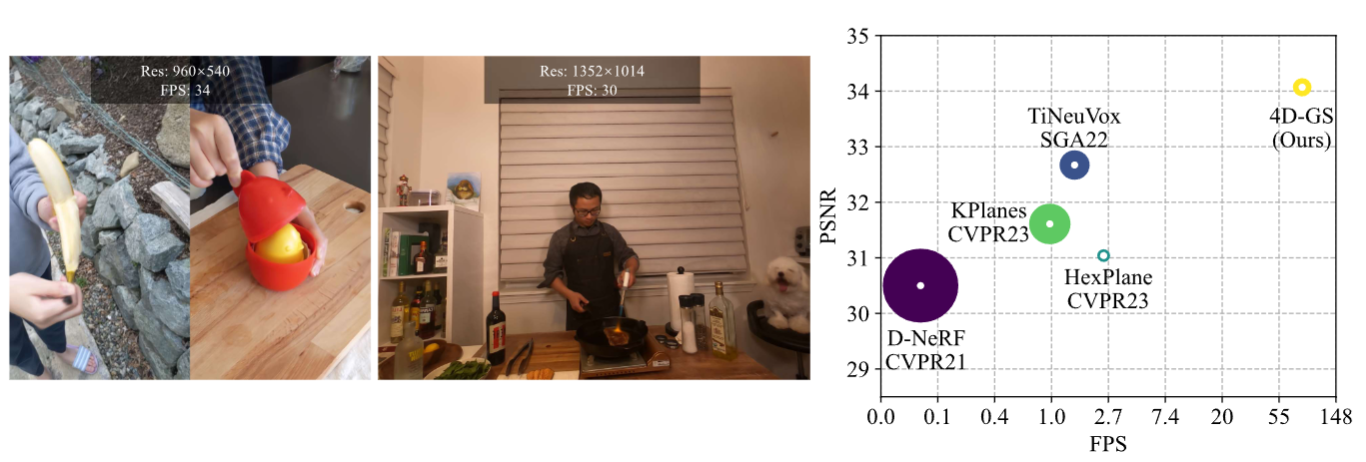
Our method converges very quickly and achieves real-time rendering speed.
New Colab demo:[](https://colab.research.google.com/drive/1wz0D5Y9egAlcxXy8YO9UmpQ9oH51R7OW?usp=sharing) (Thanks [Tasmay-Tibrewal
](https://github.com/Tasmay-Tibrewal))
Old Colab demo:[](https://colab.research.google.com/github/hustvl/4DGaussians/blob/master/4DGaussians.ipynb) (Thanks [camenduru](https://github.com/camenduru/4DGaussians-colab).)
Light Gaussian implementation: [This link](https://github.com/pablodawson/4DGaussians) (Thanks [pablodawson](https://github.com/pablodawson))
## News
2024.6.25: we clean the code and add an explanation of the parameters.
2024.3.25: Update guidance for hypernerf and dynerf dataset.
2024.03.04: We change the hyperparameters of the Neu3D dataset, corresponding to our paper.
2024.02.28: Update SIBR viewer guidance.
2024.02.27: Accepted by CVPR 2024. We delete some logging settings for debugging, the corrected training time is only **8 mins** (20 mins before) in D-NeRF datasets and **30 mins** (1 hour before) in HyperNeRF datasets. The rendering quality is not affected.
## Environmental Setups
Please follow the [3D-GS](https://github.com/graphdeco-inria/gaussian-splatting) to install the relative packages.
```bash
git clone https://github.com/hustvl/4DGaussians
cd 4DGaussians
git submodule update --init --recursive
conda create -n Gaussians4D python=3.7
conda activate Gaussians4D
pip install -r requirements.txt
pip install -e submodules/depth-diff-gaussian-rasterization
pip install -e submodules/simple-knn
```
In our environment, we use pytorch=1.13.1+cu116.
## Data Preparation
**For synthetic scenes:**
The dataset provided in [D-NeRF](https://github.com/albertpumarola/D-NeRF) is used. You can download the dataset from [dropbox](https://www.dropbox.com/s/0bf6fl0ye2vz3vr/data.zip?dl=0).
**For real dynamic scenes:**
The dataset provided in [HyperNeRF](https://github.com/google/hypernerf) is used. You can download scenes from [Hypernerf Dataset](https://github.com/google/hypernerf/releases/tag/v0.1) and organize them as [Nerfies](https://github.com/google/nerfies#datasets).
Meanwhile, [Plenoptic Dataset](https://github.com/facebookresearch/Neural_3D_Video) could be downloaded from their official websites. To save the memory, you should extract the frames of each video and then organize your dataset as follows.
```
├── data
│ | dnerf
│ ├── mutant
│ ├── standup
│ ├── ...
│ | hypernerf
│ ├── interp
│ ├── misc
│ ├── virg
│ | dynerf
│ ├── cook_spinach
│ ├── cam00
│ ├── images
│ ├── 0000.png
│ ├── 0001.png
│ ├── 0002.png
│ ├── ...
│ ├── cam01
│ ├── images
│ ├── 0000.png
│ ├── 0001.png
│ ├── ...
│ ├── cut_roasted_beef
| ├── ...
```
**For multipleviews scenes:**
If you want to train your own dataset of multipleviews scenes, you can orginize your dataset as follows:
```
├── data
| | multipleview
│ | (your dataset name)
│ | cam01
| ├── frame_00001.jpg
│ ├── frame_00002.jpg
│ ├── ...
│ | cam02
│ ├── frame_00001.jpg
│ ├── frame_00002.jpg
│ ├── ...
│ | ...
```
After that, you can use the `multipleviewprogress.sh` we provided to generate related data of poses and pointcloud.You can use it as follows:
```bash
bash multipleviewprogress.sh (youe dataset name)
```
You need to ensure that the data folder is organized as follows after running multipleviewprogress.sh:
```
├── data
| | multipleview
│ | (your dataset name)
│ | cam01
| ├── frame_00001.jpg
│ ├── frame_00002.jpg
│ ├── ...
│ | cam02
│ ├── frame_00001.jpg
│ ├── frame_00002.jpg
│ ├── ...
│ | ...
│ | sparse_
│ ├── cameras.bin
│ ├── images.bin
│ ├── ...
│ | points3D_multipleview.ply
│ | poses_bounds_multipleview.npy
```
## Training
For training synthetic scenes such as `bouncingballs`, run
```
python train.py -s data/dnerf/bouncingballs --port 6017 --expname "dnerf/bouncingballs" --configs arguments/dnerf/bouncingballs.py
```
For training dynerf scenes such as `cut_roasted_beef`, run
```python
# First, extract the frames of each video.
python scripts/preprocess_dynerf.py --datadir data/dynerf/cut_roasted_beef
# Second, generate point clouds from input data.
bash colmap.sh data/dynerf/cut_roasted_beef llff
# Third, downsample the point clouds generated in the second step.
python scripts/downsample_point.py data/dynerf/cut_roasted_beef/colmap/dense/workspace/fused.ply data/dynerf/cut_roasted_beef/points3D_downsample2.ply
# Finally, train.
python train.py -s data/dynerf/cut_roasted_beef --port 6017 --expname "dynerf/cut_roasted_beef" --configs arguments/dynerf/cut_roasted_beef.py
```
For training hypernerf scenes such as `virg/broom`: Pregenerated point clouds by COLMAP are provided [here](https://drive.google.com/file/d/1fUHiSgimVjVQZ2OOzTFtz02E9EqCoWr5/view). Just download them and put them in to correspond folder, and you can skip the former two steps. Also, you can run the commands directly.
```python
# First, computing dense point clouds by COLMAP
bash colmap.sh data/hypernerf/virg/broom2 hypernerf
# Second, downsample the point clouds generated in the first step.
python scripts/downsample_point.py data/hypernerf/virg/broom2/colmap/dense/workspace/fused.ply data/hypernerf/virg/broom2/points3D_downsample2.ply
# Finally, train.
python train.py -s data/hypernerf/virg/broom2/ --port 6017 --expname "hypernerf/broom2" --configs arguments/hypernerf/broom2.py
```
For training multipleviews scenes,you are supposed to build a configuration file named (you dataset name).py under "./arguments/mutipleview",after that,run
```python
python train.py -s data/multipleview/(your dataset name) --port 6017 --expname "multipleview/(your dataset name)" --configs arguments/multipleview/(you dataset name).py
```
For your custom datasets, install nerfstudio and follow their [COLMAP](https://colmap.github.io/) pipeline. You should install COLMAP at first, then:
```python
pip install nerfstudio
# computing camera poses by colmap pipeline
ns-process-data images --data data/your-data --output-dir data/your-ns-data
cp -r data/your-ns-data/images data/your-ns-data/colmap/images
python train.py -s data/your-ns-data/colmap --port 6017 --expname "custom" --configs arguments/hypernerf/default.py
```
You can customize your training config through the config files.
## Checkpoint
Also, you can train your model with checkpoint.
```python
python train.py -s data/dnerf/bouncingballs --port 6017 --expname "dnerf/bouncingballs" --configs arguments/dnerf/bouncingballs.py --checkpoint_iterations 200 # change it.
```
Then load checkpoint with:
```python
python train.py -s data/dnerf/bouncingballs --port 6017 --expname "dnerf/bouncingballs" --configs arguments/dnerf/bouncingballs.py --start_checkpoint "output/dnerf/bouncingballs/chkpnt_coarse_200.pth"
# finestage: --start_checkpoint "output/dnerf/bouncingballs/chkpnt_fine_200.pth"
```
## Rendering
Run the following script to render the images.
```
python render.py --model_path "output/dnerf/bouncingballs/" --skip_train --configs arguments/dnerf/bouncingballs.py
```
## Evaluation
You can just run the following script to evaluate the model.
```
python metrics.py --model_path "output/dnerf/bouncingballs/"
```
## Viewer
[Watch me](./docs/viewer_usage.md)
## Scripts
There are some helpful scripts, please feel free to use them.
`export_perframe_3DGS.py`:
get all 3D Gaussians point clouds at each timestamps.
usage:
```python
python export_perframe_3DGS.py --iteration 14000 --configs arguments/dnerf/lego.py --model_path output/dnerf/lego
```
You will a set of 3D Gaussians are saved in `output/dnerf/lego/gaussian_pertimestamp`.
`weight_visualization.ipynb`:
visualize the weight of Multi-resolution HexPlane module.
`merge_many_4dgs.py`:
merge your trained 4dgs.
usage:
```python
export exp_name="dynerf"
python merge_many_4dgs.py --model_path output/$exp_name/sear_steak
```
`colmap.sh`:
generate point clouds from input data
```bash
bash colmap.sh data/hypernerf/virg/vrig-chicken hypernerf
bash colmap.sh data/dynerf/sear_steak llff
```
**Blender** format seems doesn't work. Welcome to raise a pull request to fix it.
`downsample_point.py` :downsample generated point clouds by sfm.
```python
python scripts/downsample_point.py data/dynerf/sear_steak/colmap/dense/workspace/fused.ply data/dynerf/sear_steak/points3D_downsample2.ply
```
In my paper, I always use `colmap.sh` to generate dense point clouds and downsample it to less than 40000 points.
Here are some codes maybe useful but never adopted in my paper, you can also try it.
## Awesome Concurrent/Related Works
Welcome to also check out these awesome concurrent/related works, including but not limited to
[Deformable 3D Gaussians for High-Fidelity Monocular Dynamic Scene Reconstruction](https://ingra14m.github.io/Deformable-Gaussians/)
[SC-GS: Sparse-Controlled Gaussian Splatting for Editable Dynamic Scenes](https://yihua7.github.io/SC-GS-web/)
[MD-Splatting: Learning Metric Deformation from 4D Gaussians in Highly Deformable Scenes](https://md-splatting.github.io/)
[4DGen: Grounded 4D Content Generation with Spatial-temporal Consistency](https://vita-group.github.io/4DGen/)
[Diffusion4D: Fast Spatial-temporal Consistent 4D Generation via Video Diffusion Models](https://github.com/VITA-Group/Diffusion4D)
[DreamGaussian4D: Generative 4D Gaussian Splatting](https://github.com/jiawei-ren/dreamgaussian4d)
[EndoGaussian: Real-time Gaussian Splatting for Dynamic Endoscopic Scene Reconstruction](https://github.com/yifliu3/EndoGaussian)
[EndoGS: Deformable Endoscopic Tissues Reconstruction with Gaussian Splatting](https://github.com/HKU-MedAI/EndoGS)
[Endo-4DGS: Endoscopic Monocular Scene Reconstruction with 4D Gaussian Splatting](https://arxiv.org/abs/2401.16416)
## Contributions
**This project is still under development. Please feel free to raise issues or submit pull requests to contribute to our codebase.**
Some source code of ours is borrowed from [3DGS](https://github.com/graphdeco-inria/gaussian-splatting), [K-planes](https://github.com/Giodiro/kplanes_nerfstudio), [HexPlane](https://github.com/Caoang327/HexPlane), [TiNeuVox](https://github.com/hustvl/TiNeuVox), [Depth-Rasterization](https://github.com/ingra14m/depth-diff-gaussian-rasterization). We sincerely appreciate the excellent works of these authors.
## Acknowledgement
We would like to express our sincere gratitude to [@zhouzhenghong-gt](https://github.com/zhouzhenghong-gt/) for his revisions to our code and discussions on the content of our paper.
## Citation
Some insights about neural voxel grids and dynamic scenes reconstruction originate from [TiNeuVox](https://github.com/hustvl/TiNeuVox). If you find this repository/work helpful in your research, welcome to cite these papers and give a ⭐.
```
@InProceedings{Wu_2024_CVPR,
author = {Wu, Guanjun and Yi, Taoran and Fang, Jiemin and Xie, Lingxi and Zhang, Xiaopeng and Wei, Wei and Liu, Wenyu and Tian, Qi and Wang, Xinggang},
title = {4D Gaussian Splatting for Real-Time Dynamic Scene Rendering},
booktitle = {Proceedings of the IEEE/CVF Conference on Computer Vision and Pattern Recognition (CVPR)},
month = {June},
year = {2024},
pages = {20310-20320}
}
@inproceedings{TiNeuVox,
author = {Fang, Jiemin and Yi, Taoran and Wang, Xinggang and Xie, Lingxi and Zhang, Xiaopeng and Liu, Wenyu and Nie\ss{}ner, Matthias and Tian, Qi},
title = {Fast Dynamic Radiance Fields with Time-Aware Neural Voxels},
year = {2022},
booktitle = {SIGGRAPH Asia 2022 Conference Papers}
}
```