# SpatialTrackerV2: 3D Point Tracking Made Easy
**[CAD&CG, Zhejiang University](https://github.com/zju3dv)**; **[University of Oxford](https://www.robots.ox.ac.uk/~vgg/)**; **[Ant Research](https://www.antresearch.com/)**; **[Pixelwise AI](http://pixelwise.ai/)**; **[Bytedance Seed](https://seed.bytedance.com/zh/)**
[Yuxi Xiao](https://henry123-boy.github.io/), [Jianyuan Wang](https://jytime.github.io/), [Nan Xue](https://xuenan.net/), [Nikita Karaev](https://nikitakaraevv.github.io/), [Iurii Makarov](https://linkedin.com/in/lvoursl), [Bingyi Kang](https://bingykang.github.io/), [Xin Zhu](https://openreview.net/profile?id=~Xing_Zhu2), [Hujun Bao](http://www.cad.zju.edu.cn/home/bao/), [Yujun Shen](https://shenyujun.github.io/), [Xiaowei Zhou](https://www.xzhou.me/)
### [Project Page](https://spatialtracker.github.io/) | [BibTeX]() | [Google Drive](https://drive.google.com/drive/u/1/folders/1GYeC639gA23N_OiytGHXTUCSYrbM0pOo?dmr=1&ec=wgc-drive-globalnav-goto)




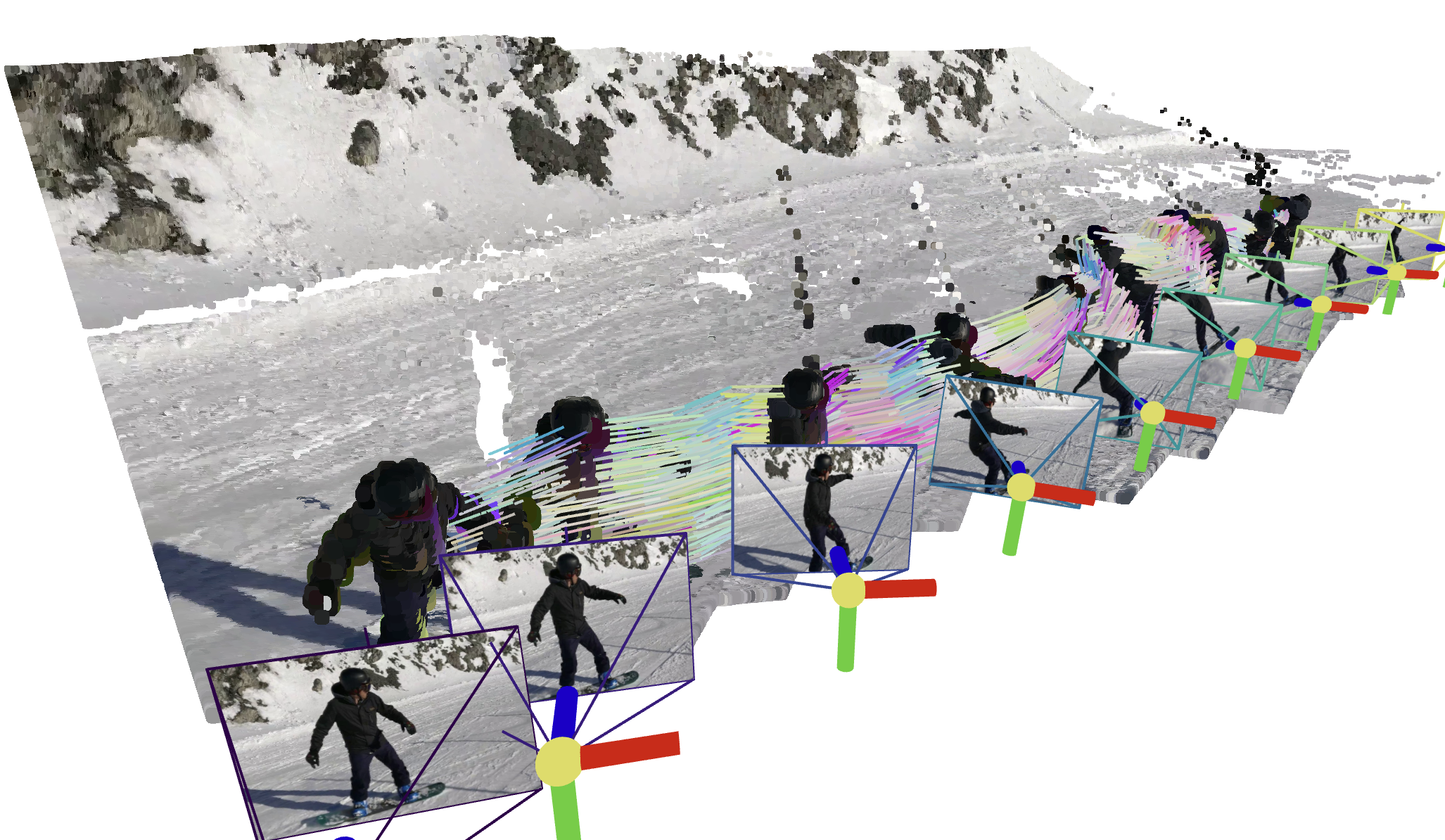 ## 📰 Latest Updates & News
- **[June 27, 2025]**: SpatialTrackerV2 accepted by ICCV 2025
- **[June 23, 2025]**: Huggingface Space Demo launched! Try it out: 🤗 [Huggingface Space](https://huggingface.co/spaces/Yuxihenry/SpatialTrackerV2)
## TODO List
- [x] Release quick start of `SpaTrack2-offline`
- [ ] Final version of Paper at [PAPER.md](./docs/PAPER.md)
- [ ] Release `SpaTrack2-online`
- [ ] Training & Evaluation Codes.
- [ ] More supports for other Depth Model, *e.g.*, `DepthAnything`, `StereoFoundation`, `UniDepth`, `Metric3D`.
- [ ] `Ceres Python Bindings` designed for SpatialTracker and Dynamic Reconstruction.
## Set up the environment
To set up the environment for running the SpaTrack model, follow these steps:
1. **Clone the Repository:**
```bash
git clone git@github.com:henry123-boy/SpaTrackerV2.git
cd SpaTrackerV2
```
2. **Create a Virtual Environment:**
It's recommended to use a virtual environment to manage dependencies.
```bash
conda create -n SpaTrack2 python=3.11
conda activate SpaTrack2
```
3. **Install Dependencies:**
Install the torch dependencies `pip` (tested with `torch2.4`).
```bash
python -m pip install torch==2.4.1 torchvision==0.19.1 torchaudio==2.4.1 --index-url https://download.pytorch.org/whl/cu124
```
Install the required Python packages using `pip`.
```bash
python -m pip install -r requirements.txt
```
By following these steps, you should have a working environment ready to run the SpaTrack model.
## Quick Start
Here are two examples of how to use `SpaTrack2`.
### Type1: Monocular video as input *(Example0)*
```
python inference.py --data_type="RGB" --data_dir="examples" --video_name="protein" --fps=3
```
### Type2: RGBD video + Camera poses as input *(Example1)*
We provide an example with Depth and Camera poses from [MegaSAM](https://github.com/mega-sam/mega-sam).
First, download the `examples` via:
```
sh scripts/download.sh
```
Then run inference with the command with below:
```
python inference.py --data_type="RGBD" --data_dir="assets/example1" --video_name="snowboard" --fps=1
```
### Visualize your results
Guidance will be displayed in the terminal after running `inference.py`.
## 🌟 Recommended: Gradio Demo with SAM 🌟
Please follow the instructions in the [app_3rd README](app_3rd/README.md) to configure the dependencies. Then, install the required packages:
```
python -m pip install gradio==5.31.0 pako
```
Our Gradio demo enables users to easily track points on the target object. Just try:
```
python app.py
```
## 📰 Latest Updates & News
- **[June 27, 2025]**: SpatialTrackerV2 accepted by ICCV 2025
- **[June 23, 2025]**: Huggingface Space Demo launched! Try it out: 🤗 [Huggingface Space](https://huggingface.co/spaces/Yuxihenry/SpatialTrackerV2)
## TODO List
- [x] Release quick start of `SpaTrack2-offline`
- [ ] Final version of Paper at [PAPER.md](./docs/PAPER.md)
- [ ] Release `SpaTrack2-online`
- [ ] Training & Evaluation Codes.
- [ ] More supports for other Depth Model, *e.g.*, `DepthAnything`, `StereoFoundation`, `UniDepth`, `Metric3D`.
- [ ] `Ceres Python Bindings` designed for SpatialTracker and Dynamic Reconstruction.
## Set up the environment
To set up the environment for running the SpaTrack model, follow these steps:
1. **Clone the Repository:**
```bash
git clone git@github.com:henry123-boy/SpaTrackerV2.git
cd SpaTrackerV2
```
2. **Create a Virtual Environment:**
It's recommended to use a virtual environment to manage dependencies.
```bash
conda create -n SpaTrack2 python=3.11
conda activate SpaTrack2
```
3. **Install Dependencies:**
Install the torch dependencies `pip` (tested with `torch2.4`).
```bash
python -m pip install torch==2.4.1 torchvision==0.19.1 torchaudio==2.4.1 --index-url https://download.pytorch.org/whl/cu124
```
Install the required Python packages using `pip`.
```bash
python -m pip install -r requirements.txt
```
By following these steps, you should have a working environment ready to run the SpaTrack model.
## Quick Start
Here are two examples of how to use `SpaTrack2`.
### Type1: Monocular video as input *(Example0)*
```
python inference.py --data_type="RGB" --data_dir="examples" --video_name="protein" --fps=3
```
### Type2: RGBD video + Camera poses as input *(Example1)*
We provide an example with Depth and Camera poses from [MegaSAM](https://github.com/mega-sam/mega-sam).
First, download the `examples` via:
```
sh scripts/download.sh
```
Then run inference with the command with below:
```
python inference.py --data_type="RGBD" --data_dir="assets/example1" --video_name="snowboard" --fps=1
```
### Visualize your results
Guidance will be displayed in the terminal after running `inference.py`.
## 🌟 Recommended: Gradio Demo with SAM 🌟
Please follow the instructions in the [app_3rd README](app_3rd/README.md) to configure the dependencies. Then, install the required packages:
```
python -m pip install gradio==5.31.0 pako
```
Our Gradio demo enables users to easily track points on the target object. Just try:
```
python app.py
```