 faa09bd2bf
* feat: desktop revamp

* feat: refactor system monitor

* fix linter CI

* remove unused import component

* added responsive and resizeable component

* responsive and resizeable local server page

* finalize responsive and resizeable component

* fix scroll custom ui

* remove react scroll to bottom from modal troubleshoot

* fix modal troubleshoot ui

* fix setting gpu list

* text area custom scroll bar

* fix padding message input

* cleanup classname

* update inference engine model dropdown

* update loader style

* update quick ask ui

* prepare theme provider

* update dark theme

* remove update hotkey list model and navigation

* fix: cleanup hardcode classname

* fix: update feedback

* Set native theme electron

* update destop ui revamp from feedback

* update button icon component insider icon chat input message

* update model dropdown ui

* update tranaparent baclground

* update logo model provider

* fix: set background material acrylic support to blur background windows

* fix: update tranparent left and right panel

* fix: linter CI

* update app using frameless window

* styling custom style minimize, maximize and close app

* temporary hidden maximize window

* fix: responsive left and right panel

* fix: enable click outside when leftpanel responsive

* fix: remove unused import

* update transparent variable css windows

* fix: ui import model

* feat: Support Theme system (#2946)

* feat: update support theme system

* update select component

* feat: add theme folder in root project

* fix: padding left and right center panel

* fix: update padding left and right

* chore: migrate themes

* fix: rmdirsync error

* chore: update gitignore

* fix: cp recursive

* fix: files electron package json

* fix: migration

* fix: update fgit ignore

---------

Co-authored-by: Louis <louis@jan.ai>

* fix: update feedback missing state when refrash app

* fix: error test CI

* chore: refactor useLoadThemes

* chore: cleanup unused vars

* fix: revert back menubar windows

* fix minor ui

* fix: minor ui

---------

Co-authored-by: Louis <louis@jan.ai>

Jan - Turn your computer into an AI computer





Getting Started - Docs - Changelog - Bug reports - Discord
Warning
Jan is currently in Development: Expect breaking changes and bugs!
Jan is an open-source ChatGPT alternative that runs 100% offline on your computer.
Jan runs on any hardware. From PCs to multi-GPU clusters, Jan supports universal architectures:
- NVIDIA GPUs (fast)
- Apple M-series (fast)
- Apple Intel
- Linux Debian
- Windows x64
Download
| Version Type | Windows | MacOS | Linux | ||
| Stable (Recommended) |
 jan.exe
|
 Intel
Intel
|
M1/M2/M3/M4
|
 jan.deb
|
jan.AppImage
|
| Experimental (Nightly Build) |
jan.exe
|
Intel
|
M1/M2/M3/M4
|
jan.deb
|
jan.AppImage
|
Download the latest version of Jan at https://jan.ai/ or visit the GitHub Releases to download any previous release.
Demo
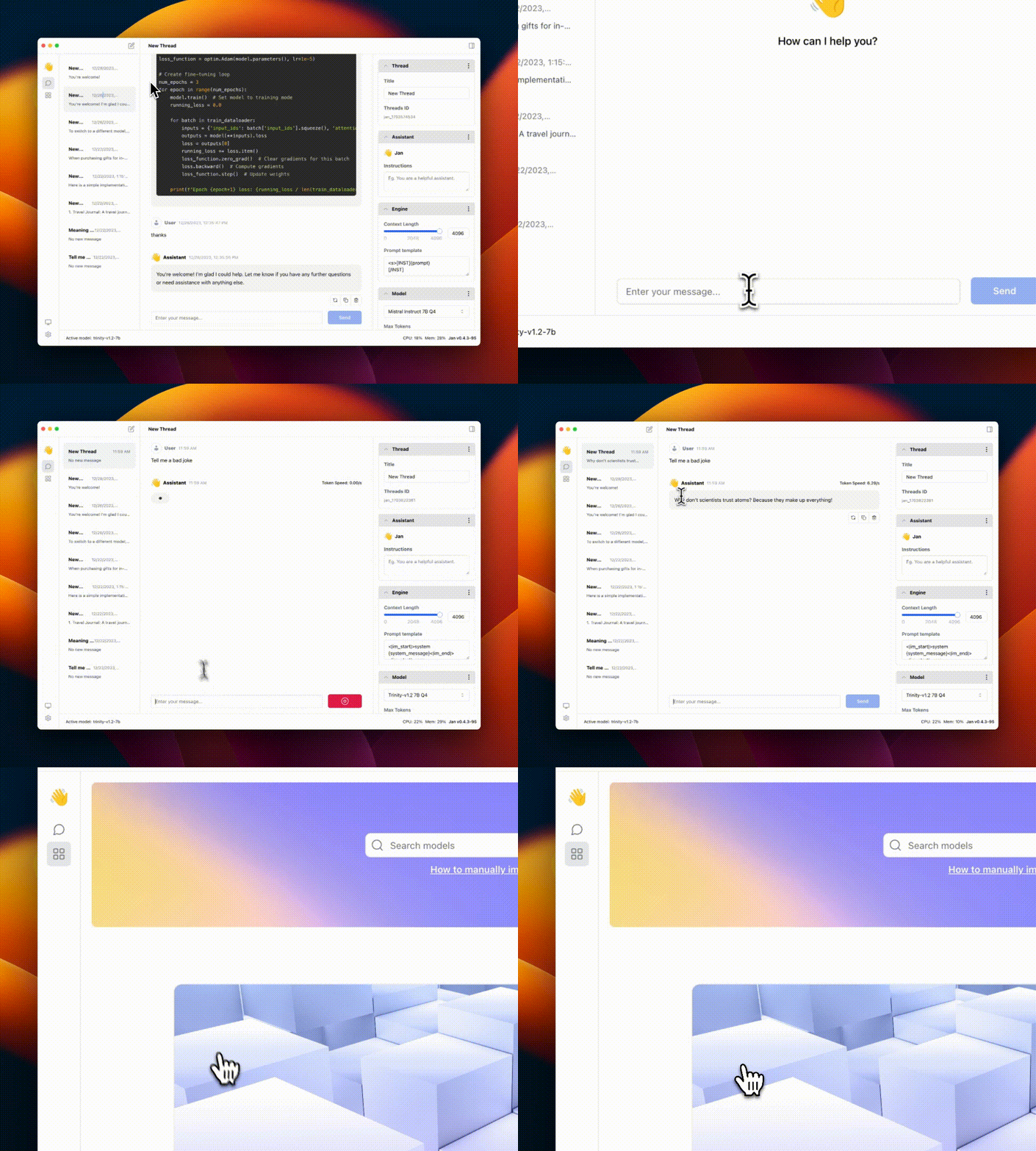
Realtime Video: Jan v0.4.3-nightly on a Mac M1, 16GB Sonoma 14
Quicklinks
Jan
Nitro
Nitro is a high-efficiency C++ inference engine for edge computing. It is lightweight and embeddable, and can be used on its own within your own projects.
Troubleshooting
As Jan is in development mode, you might get stuck on a broken build.
To reset your installation:
-
Use the following commands to remove any dangling backend processes:
ps aux | grep nitroLook for processes like "nitro" and "nitro_arm_64," and kill them one by one with:
kill -9 <PID> -
Remove Jan from your Applications folder and Cache folder
make cleanThis will remove all build artifacts and cached files:
- Delete Jan extension from your
~/jan/extensionsfolder - Delete all
node_modulesin current folder - Clear Application cache in
~/Library/Caches/jan
- Delete Jan extension from your
Requirements for running Jan
- MacOS: 13 or higher
- Windows:
- Windows 10 or higher
- To enable GPU support:
- Nvidia GPU with CUDA Toolkit 11.7 or higher
- Nvidia driver 470.63.01 or higher
- Linux:
- glibc 2.27 or higher (check with
ldd --version) - gcc 11, g++ 11, cpp 11 or higher, refer to this link for more information
- To enable GPU support:
- Nvidia GPU with CUDA Toolkit 11.7 or higher
- Nvidia driver 470.63.01 or higher
- glibc 2.27 or higher (check with
Contributing
Contributions are welcome! Please read the CONTRIBUTING.md file
Pre-requisites
- node >= 20.0.0
- yarn >= 1.22.0
- make >= 3.81
Instructions
-
Clone the repository and prepare:
git clone https://github.com/janhq/jan cd jan git checkout -b DESIRED_BRANCH -
Run development and use Jan Desktop
make dev
This will start the development server and open the desktop app.
-
(Optional) Run the API server without frontend
yarn dev:server
For production build
# Do steps 1 and 2 in the previous section
# Build the app
make build
This will build the app MacOS m1/m2 for production (with code signing already done) and put the result in dist folder.
Docker mode
-
Supported OS: Linux, WSL2 Docker
-
Pre-requisites:
-
Docker Engine and Docker Compose are required to run Jan in Docker mode. Follow the instructions below to get started with Docker Engine on Ubuntu.
curl -fsSL https://get.docker.com -o get-docker.sh sudo sh ./get-docker.sh --dry-run -
If you intend to run Jan in GPU mode, you need to install
nvidia-driverandnvidia-docker2. Follow the instruction here for installation.
-
-
Run Jan in Docker mode
User can choose between
docker-compose.ymlwith latest prebuilt docker image ordocker-compose-dev.ymlwith local docker build
| Docker compose Profile | Description |
|---|---|
cpu-fs |
Run Jan in CPU mode with default file system |
cpu-s3fs |
Run Jan in CPU mode with S3 file system |
gpu-fs |
Run Jan in GPU mode with default file system |
gpu-s3fs |
Run Jan in GPU mode with S3 file system |
| Environment Variable | Description |
|---|---|
S3_BUCKET_NAME |
S3 bucket name - leave blank for default file system |
AWS_ACCESS_KEY_ID |
AWS access key ID - leave blank for default file system |
AWS_SECRET_ACCESS_KEY |
AWS secret access key - leave blank for default file system |
AWS_ENDPOINT |
AWS endpoint URL - leave blank for default file system |
AWS_REGION |
AWS region - leave blank for default file system |
API_BASE_URL |
Jan Server URL, please modify it as your public ip address or domain name default http://localhost:1377 |
-
Option 1: Run Jan in CPU mode
# cpu mode with default file system docker compose --profile cpu-fs up -d # cpu mode with S3 file system docker compose --profile cpu-s3fs up -d -
Option 2: Run Jan in GPU mode
-
Step 1: Check CUDA compatibility with your NVIDIA driver by running
nvidia-smiand check the CUDA version in the outputnvidia-smi # Output +---------------------------------------------------------------------------------------+ | NVIDIA-SMI 531.18 Driver Version: 531.18 CUDA Version: 12.1 | |-----------------------------------------+----------------------+----------------------+ | GPU Name TCC/WDDM | Bus-Id Disp.A | Volatile Uncorr. ECC | | Fan Temp Perf Pwr:Usage/Cap| Memory-Usage | GPU-Util Compute M. | | | | MIG M. | |=========================================+======================+======================| | 0 NVIDIA GeForce RTX 4070 Ti WDDM | 00000000:01:00.0 On | N/A | | 0% 44C P8 16W / 285W| 1481MiB / 12282MiB | 2% Default | | | | N/A | +-----------------------------------------+----------------------+----------------------+ | 1 NVIDIA GeForce GTX 1660 Ti WDDM | 00000000:02:00.0 Off | N/A | | 0% 49C P8 14W / 120W| 0MiB / 6144MiB | 0% Default | | | | N/A | +-----------------------------------------+----------------------+----------------------+ | 2 NVIDIA GeForce GTX 1660 Ti WDDM | 00000000:05:00.0 Off | N/A | | 29% 38C P8 11W / 120W| 0MiB / 6144MiB | 0% Default | | | | N/A | +-----------------------------------------+----------------------+----------------------+ +---------------------------------------------------------------------------------------+ | Processes: | | GPU GI CI PID Type Process name GPU Memory | | ID ID Usage | |=======================================================================================| -
Step 2: Visit NVIDIA NGC Catalog and find the smallest minor version of image tag that matches your CUDA version (e.g., 12.1 -> 12.1.0)
-
Step 3: Update the
Dockerfile.gpuline number 5 with the latest minor version of the image tag from step 2 (e.g. changeFROM nvidia/cuda:12.2.0-runtime-ubuntu22.04 AS basetoFROM nvidia/cuda:12.1.0-runtime-ubuntu22.04 AS base) -
Step 4: Run command to start Jan in GPU mode
# GPU mode with default file system
docker compose --profile gpu-fs up -d

# GPU mode with S3 file system
docker compose --profile gpu-s3fs up -d
-
This will start the web server and you can access Jan at http://localhost:3000.
Note: RAG feature is not supported in Docker mode with s3fs yet.
Acknowledgements
Jan builds on top of other open-source projects:
Contact
- Bugs & requests: file a GitHub ticket
- For discussion: join our Discord here
- For business inquiries: email hello@jan.ai
- For jobs: please email hr@jan.ai
Trust & Safety
Beware of scams.
- We will never ask you for personal info
- We are a free product; there's no paid version
- We don't have a token or ICO
- We are not actively fundraising or seeking donations
License
Jan is free and open source, under the AGPLv3 license.