
8.5 KiB
| sidebar_position | title |
|---|---|
| 2 | Anatomy of 👋Jan |
This page explains all the architecture of Jan.
Synchronous architecture

Overview
The architecture of the Jan application is designed to provide a seamless experience for the users while also being modular and extensible.
BackEnd and FrontEnd
BackEnd:
- The BackEnd serves as the brain of the application. It processes the information, performs computations, and manages the main logic of the system.
:::info This is like an OS (Operating System) in the computer. :::
FrontEnd:
- The FrontEnd is the interface that users interact with. It takes user inputs, displays results, and communicates with the BackEnd through Inter-process communication bi-directionally.
:::info This is like VSCode application :::
Inter-process communication:
- A mechanism that allows the BackEnd and FrontEnd to communicate in real time. It ensures that data flows smoothly between the two, facilitating rapid response and dynamic updates.
Plugins and Apps
Plugins:
In Jan, Plugins contains all the core features. They could be Core Plugins or Nitro
-
Load: This denotes the initialization and activation of a plugin when the application starts or when a user activates it.
-
Implement: This is where the main functionality of the plugin resides. Developers code the desired features and functionalities here. This is a "call to action" feature.
-
Dispose: After the plugin's task is completed or deactivated, this function ensures that it releases any resources it uses, providing optimal performance and preventing memory leaks.
:::info This is like Extensions in VSCode. :::
Apps:
Apps are basically Plugin-like. However, Apps can be built by users for their own purposes.
For example, users can build a
Personal Document RAG Appto chat with specific documents or articles.
With Plugins and Apps, users can build a broader ecosystem surrounding Jan.
Asynchronous architecture
Overview
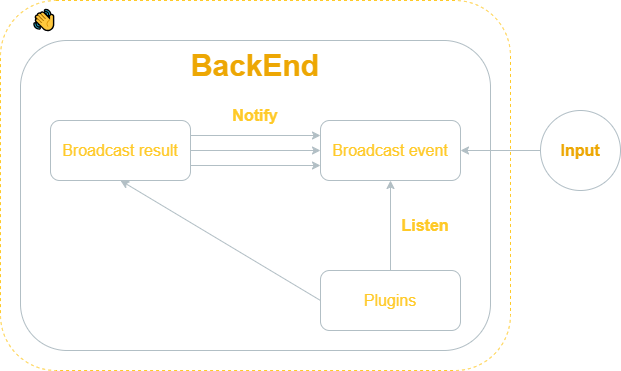
The asynchronous architecture allows Jan to handle multiple operations simultaneously without waiting for one to complete before starting another. This results in a more efficient and responsive user experience. The provided diagram breaks down the primary components and their interactions.
Components
Results
After processing certain tasks or upon specific triggers, the backend can broadcast the results. This could be a processed data set, a calculated result, or any other output that needs to be shared.
Events
Similar to broadcasting results but oriented explicitly towards events. This could include user actions, system events, or notifications that other components should be aware of.
- Notify:
Upon the conclusion of specific tasks or when particular triggers are activated, the system uses the Notify action to send out notifications from the Results. The Notify action is the conduit through which results are broadcasted asynchronously, whether they concern task completions, errors, updates, or any processed data set.
- Listen:
Here, the BackEnd actively waits for incoming data or events. It is geared towards capturing inputs from users or updates from plugins.
Plugins
These are modular components or extensions designed to enhance the application's functionalities. Each plugin possesses a "Listen" action, enabling it to stand by for requests emanating from user inputs.
Flow
- Input is provided by the user or an external source.
- This input is broadcasted as an event into the Broadcast event.
- The BackEnd processes the event. Depending on the event, it might interact with one or several Plugins.
- Once processed, Broadcast result can be sent out asynchronously through multiple notifications via Notify action.
Jan workflow
Overview
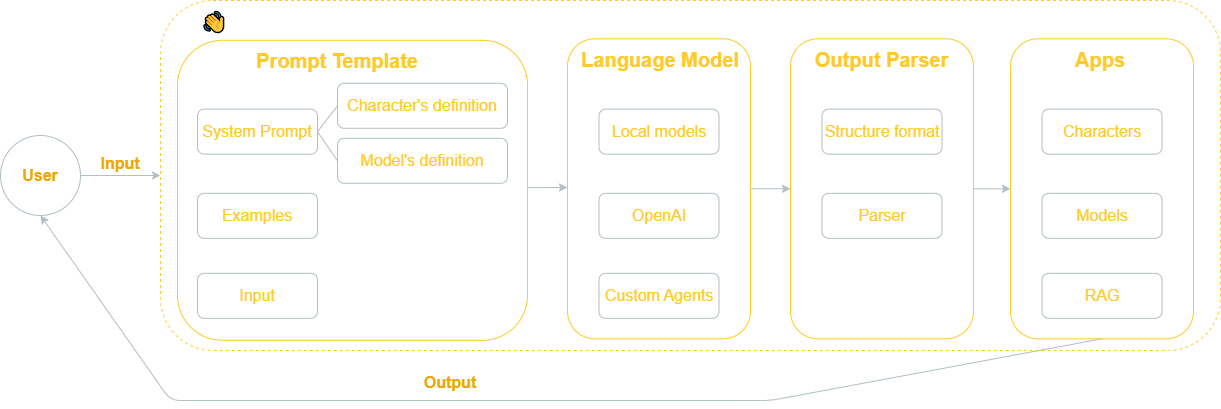
The architecture of the Jan desktop application is structured into four primary modules: "Prompt Template," "Language Model," "Output Parser," and "Apps." Let's break down each module and understand its components.
Prompt Template
This is where predefined templates are stored. It sets the format and structure for user interactions. It contains:
- Character's definition:
Definitions of various characters or entities that may be interacted with or invoked during user requests (e.g., name, personality, and communication style).
- Model's definition:
Definitions related to the different language models (e.g., objectives, capabilities, and constraints)
- Examples:
Sample inputs and outputs for guidance. If given good examples, LLM could enable basic reasoning or planning skills.
- Input:
The actual user query or request that is being processed.
Large Language Model
This processes the input provided.
- Local models:
These are the downloaded models that reside within the system. They can process requests without the need to connect to external resources.
- OpenAI:
This will connect you with OpenAI API, allowing the application to utilize powerful models like GPT-3.5 and GPT-4.
:::info To use OpenAI models, you must have an OpenAI account and secret key. You can get your OpenAI key here. :::
- Custom Agents:
These are user-defined or third-party models that can be integrated into the Jan system for specific tasks.
Output Parser
Language models produce textual content. However, often, there's a need for more organized data instead of plain text. This is achieved using output parsers.
- Parser:
This component ensures that the output conforms to the desired structure and format, removing unwanted information or errors.
Apps
This represents applications or extensions that can be integrated with Jan.
-
Characters: Characters or entities that can be utilized within the applications.
-
Models: Different Large Language Models, Large Multimodal Models, and Stable Diffusion models that the apps might use.
-
RAG: Represents a "Retrieval Augmented Generation" functionality, which helps in fetching relevant data and generating responses based on it.
Jan Platform

Overview
The architecture of Jan can be thought of as a layered system, comprising of the FrontEnd, Middleware, and BackEnd. Each layer has distinct components and responsibilities, ensuring a modular and scalable approach.
FrontEnd
The FrontEnd is the visible part of Jan that interacts directly with the user.
-
Controller: This is the main control unit of the FrontEnd. It processes the user's inputs, handles UI events, and communicates with other layers to fetch or send data.
-
Apps: This represents applications or extensions that can be integrated with Jan.
-
Execute Request act as the initial triggers to initiate processes within the application.
Middleware
It's a bridge between the FrontEnd and BackEnd. It's responsible for translating requests and ensuring smooth data flow.
-
SDK: Stands for Software Development Kit. It provides a set of tools, libraries, and guidelines for developers to build and integrate custom applications or features with Jan.
-
Core: It's tasked with managing the connections between the FrontEnd and BackEnd. It ensures data is routed correctly and efficiently between the two.
-
Local Native: Refers to the connectors that enable communication with local services or applications. This will use your own hardware to ddeploy models.
-
Cloud Native: As the name suggests, these connectors are tailored for cloud-based interactions, allowing Jan to leverage cloud services or interact with other cloud-based applications.
:::info The Middleware communicates with the BackEnd primarily through IPC for Local and Http for Cloud. :::
BackEnd
It is responsible for data processing, storage, and other core functionalities.
-
Plugins: Extendable modules that can be added to the Jan system to provide additional functionalities or integrations with third-party applications.
-
Nitro: This is a high-performance engine or a set of services that power specific functionalities within Jan. Given its placement in the architecture, it's reasonable to assume that Nitro provides acceleration or optimization capabilities for tasks.